Inside N1 · Part 1
Meet N1: Apple’s wireless chip
On an M6 Mac mini, the Bluetooth section of system_profiler, macOS’s hardware report, names the chip behind the Mac’s wireless:
$ system_profiler SPBluetoothDataType | sed -n '/Bluetooth Controller:/,/Connected:/p' | grep -E 'Chipset|Transport'
          Chipset: Apple N1
          Transport: PCIe
N1 is the chip behind the Mac’s Wi-Fi, Bluetooth and Thread. Its firmware also carries code for jobs that some wireless chips leave to the operating system, such as joining a Wi-Fi network. In this post we work out which jobs N1’s firmware has code for, which macOS processes talk to the chip, and how their messages reach it.
Apple designed N1 itself and introduced it with the iPhone 17 lineup in September 2025 as the chip for Wi-Fi 7, Bluetooth 6 and Thread, a low-power mesh network for connected devices, and Apple’s deployment guide now lists it in iPhone, iPad and MacBook models. On our Mac the Wi-Fi section of system_profiler names it too, in a firmware banner ending in N1_b, and lists 802.11be, Wi-Fi 7, among the modes it supports:
$ system_profiler SPAirPortDataType | grep -E 'Card Type|Supported PHY'
          Card Type: chip id: 0x11 api 1.2 firmware [Rev 91.104.6 PrxB1 dF=0] phy [30.1.148.0], core80211 [343.104.8 N1_b ]
          Supported PHY Modes: 802.11 a/b/g/n/ac/ax/be
This is the first part of a series. We will build a model of the chip from the Mac’s files, logs and device listings. In the parts that follow we will test that model with real traffic, starting with a Bluetooth keyboard talking to our Mac.
Our Mac is an M6 Mac mini on macOS 27.0.1 (26A434). On an N1 Mac running that build, you should be able to reproduce the output of every command we show, apart from times and counts that change from run to run. We plan to publish a companion repository with the scripts and tools behind this series. If you find a mistake in our research, analysis or interpretation, please tell us at contact@almamatertech.com.
One chip, three functions
N1 is a separate chip from the Mac’s M6 processor, and the Transport line above says how the two are connected. PCIe is the same kind of link that connects an SSD or a graphics card. One PCIe device can appear to the computer as several independent devices, called functions, which the operating system finds and drives one by one. N1 appears as three. One function carries Wi-Fi, one carries both Bluetooth and Thread, and the third is for controlling the chip itself. macOS gives each function its own driver.
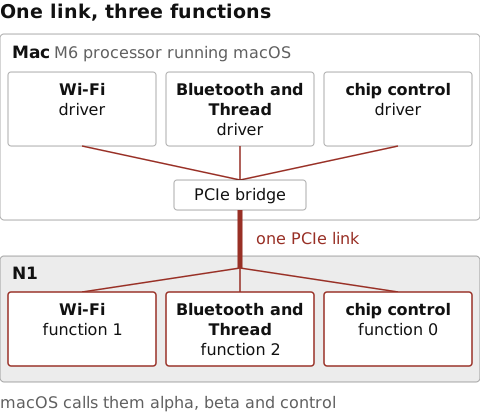
macOS names the functions after Centauri, its own name for the chip. The I/O Registry, the tree of devices and drivers that ioreg prints, shows all three under one PCIe bridge, the Mac’s end of the link. Each line’s details, such as IDs and timings, are cut at the …:
$ ioreg -p IODeviceTree -l -w0 | grep -E -- '-o (pci-bridge0|centauri-(control|alpha|beta))@.*IOPCIDevice'
    | | +-o pci-bridge0@0  <class IOPCIDevice, …>
    | | | +-o centauri-control@0  <class IOPCIDevice, …>
    | | | +-o centauri-alpha@0,1  <class IOPCIDevice, …>
    | | | +-o centauri-beta@0,2  <class IOPCIDevice, …>
The number after each @ is a PCIe address. All three are device 0, and the number after the comma is the function. Control, with a single number, is function 0. Alpha is Wi-Fi. Its driver’s settings list the Wi-Fi interfaces it creates, one for each way the chip can connect, such as STA for the ordinary connection to an access point:
$ plutil -p /System/Library/DriverExtensions/AppleCentauriAlpha.dext/Info.plist | grep -o '"AppleWLANInterface[A-Za-z]*"' | sort -u
"AppleWLANInterfaceAWDL"
"AppleWLANInterfaceHotspot"
"AppleWLANInterfaceNAN"
"AppleWLANInterfaceNANData"
"AppleWLANInterfaceSTA"
Beta is Bluetooth with Thread, and its driver is the one bluetoothd holds open, as the snapshot further down shows.
Thread shares a function with Bluetooth, and as we’ll see below, its radio code is built into the chip’s Bluetooth firmware. Sharing works because each kind of traffic gets its own channel. Inside a function, the Mac and the chip pass messages through queues, areas of memory both can reach, where one side leaves messages and the other picks them up in order. A channel is a set of these queues that a macOS service asks for by number, and Apple’s logs call channels interfaces. So Bluetooth’s messages and Thread’s radio frames travel on separate channels.
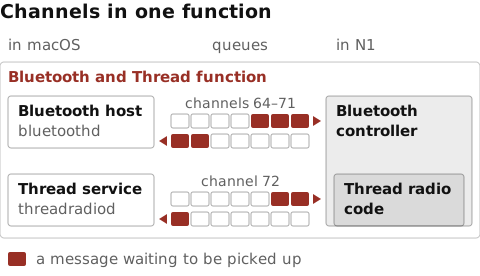
Each of the three drivers runs as a separate process outside the kernel, built with Apple’s DriverKit. The only N1-specific kernel extension we found is AppleCentauriManager:
$ ls /System/Library/DriverExtensions | grep Centauri
AppleCentauriAlpha.dext
AppleCentauriBeta.dext
AppleCentauriControl.dext
$ ls /System/Library/Extensions | grep -i centauri
AppleCentauriManager.kext
Above the drivers sit background services, which macOS calls daemons, a main one for each protocol and one for the chip as a whole. A snapshot of the I/O Registry, saved with ioreg -a -l -r -c IOUserClient, lists every open connection to a driver. We can count the ones to N1’s drivers, for each process that opened them, by parsing the snapshot with a few lines of Python. On our Mac:
  7 AirshipCentauriHelperInterfaceUserClient     bluetoothd
  1 AirshipCentauriHelperInterfaceUserClient     centaurid
  1 AirshipCentauriHelperTimesyncUserClient      bluetoothd
  1 AppleWLANWDUserClient                        airportd
  1 CentauriBetaUserClient                       bluetoothd
  1 CentauriControlUserClient                    centaurid
 13 IO80211APIUserClient                         airportd
  1 IO80211APIUserClient                         sharingd
  1 IO80211APIUserClient                         wifianalyticsd
  3 IO80211APIUserClient                         wifip2pd
  1 IO80211APIUserClient                         wifivelocityd
Each line is a count of connections, the kind of connection, and the process that opened it. airportd holds most of the Wi-Fi driver’s, bluetoothd the Bluetooth and Thread driver’s, and centaurid the control driver’s. No threadradiod appears, and the Thread section below says why. After a look at the firmware package the functions share, we take each in turn and show which macOS processes talk to it and which jobs its firmware has code for. The figure below summarizes what we found, one frame per function.
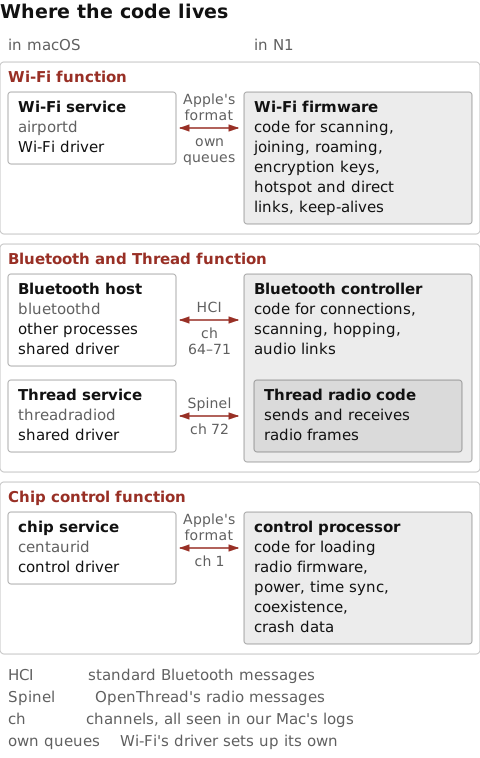
centaurid keeps. The control processor’s jobs are read from strings. Under each arrow is its channel number, all seen in our Mac’s logs. Wi-Fi’s arrow is labelled own queues, because its driver sets up its own message queues with the chip. The sections below explain each frame.Peeking inside ftab.bin
We can’t watch code run inside the chip, but we can read the firmware macOS sends it. It comes as one file, ftab.bin, 30.6 MB, in the Preboot volume, the small hidden volume macOS uses to start up. We copy it out and look at its first bytes with xxd:
$ find /System/Volumes/Preboot -maxdepth 6 -name ftab.bin 2>/dev/null
/System/Volumes/Preboot/<volume>/restore/Firmware/t2026macG2/Release/ftab.bin
$ cp /System/Volumes/Preboot/*/restore/Firmware/t2026mac*/Release/ftab.bin .
$ wc -c < ftab.bin
 30646220
$ xxd -s 0x20 -l 0x40 ftab.bin
00000020: 726b 6f73 6674 6162 5500 0000 0000 0000  rkosftabU.......
00000030: 726b 6f73 8005 0000 a08c 0d00 0000 0000  rkos............
00000040: 726b 6f6c 2092 0d00 a0ac 0c00 0000 0000  rkol ...........
00000050: 6163 6977 c03e 1a00 c0ec 2600 0000 0000  aciw.>....&.....
Those bytes are a table of contents. The first line holds the package’s signature, rkosftab, and the number of files it bundles, 55 in hex or 85. rkos reads as RTKit OS. RTKit is the operating system N1’s control processor runs, and the first file in the table, also named rkos, is that processor’s code. Each line after the first describes one file, with a four-letter name, where the file starts and how long it is, and each number is stored lowest byte first. The third file, aciw, starts at 0x1a3ec0 and is 0x26ecc0 bytes long, 2.55 MB.
Splitting the package means copying out each file’s bytes, from its start for its length. We can do that with a few lines of Python, by reading the number of files at byte 0x28, then each 16-byte line of the table from byte 0x30 on, and writing each file into a folder named ftab:
$ python3 - ftab.bin <<'EOF'
import os, struct, sys
data = open(sys.argv[1], 'rb').read()
count = struct.unpack_from('<I', data, 0x28)[0]
os.makedirs('ftab', exist_ok=True)
for i in range(count):
    name, start, size = struct.unpack_from('<4sII', data, 0x30 + 16 * i)
    open('ftab/' + name.decode(), 'wb').write(data[start:start + size])
print(count, 'files written to ftab/')
EOF
85 files written to ftab/
The ipsw tool has a parser for the same layout. Its command for Apple’s C1 modem firmware accepts packages in this format, prints their table and splits them. Its aciw line runs from our start, 0x1a3ec0, to our start plus our length, 0x412b80, and its split gives the same 85 files, byte for byte:
$ ipsw fw c1 --info ftab.bin | sed -n '1,4p;8p'
FTAB Header:
  Magic:   0x62617466736f6b72 (rkosftab)
  Version: 0
  Entries: 85
  aciw: 0x001a3ec0-0x00412b80 (2.6 MB)
$ ipsw fw c1 ftab.bin --output ipsw-out > /dev/null 2>&1
$ for f in ftab/*; do cmp -s $f ipsw-out/extracted/${f#ftab/}.bin && echo same; done | wc -l
      85
aciw carries the two version numbers in the Card Type line near the top, the firmware revision and the core80211 version:
$ strings -a ftab/aciw | grep -E 'Rev 91|Core80211'
Rev 91.104.6
Rev 91.104.6 Core80211:343.104.8
So aciw is Wi-Fi code. It’s one of the package’s firmware images, the files that hold the chip’s code. Like code for Arm’s Cortex-M processors, most of the Wi-Fi and Bluetooth images start with a vector table, which holds the stack’s starting address and then the addresses where code starts, each an odd number:
$ xxd -l 8 ftab/w2lp
00000000: f0ff 0210 d50b 1000                      ........
$ xxd -l 16 ftab/aciw
00000000: 0000 0000 45f5 1600 59f6 1600 09f6 1600  ....E...Y.......
Read lowest byte first, w2lp, another Wi-Fi image, starts with the stack address 0x1002fff0 and then the code address 0x00100bd5. aciw has zero where a stack address would be, then odd code addresses such as 0x0016f545.
Apple’s build manifest for macOS 27.0.1 gives the files names. For our Mac’s board, it lists each one under a name, such as Wireless1,ACIWIFI, together with its SHA-384 hash, a fingerprint of the file’s exact bytes. So when we hash each of the 85 files and look the hash up, the ones the manifest lists get their names, 38 in all. The other 47, among them the radio settings tables and the assert lists, have no entry. We can download the manifest from Apple’s restore image with ipsw, which reads only that one file from Apple’s server:
$ ipsw extract --remote --pattern '^BuildManifest.plist$' --output . https://updates.cdn-apple.com/2026FallFCS/59241290-5d51-4ca8-9df4-31624b9a4eac/UniversalMac_27.0.1_26A434_Restore.ipsw > /dev/null 2>&1
We can then match each file to its name by hashing it and looking the hash up, with a few lines of Python. These are the files with Wi-Fi in their names, leaving out the separate manufacturing builds, which come up later:
aciw  Wireless1,ACIWIFI
scaw  Wireless1,ScanWifi
w2lp  Wireless1,Wifi2GLMAC
w2pm  Wireless1,Wifi2GLPhy, Wireless1,Wifi2GLPhyManuf
w2pp  Wireless1,Wifi2GLPhy, Wireless1,Wifi2GLPhyManuf
w2pt  Wireless1,Wifi2GLPhyTrim
w5lp  Wireless1,Wifi5GLMAC
w5pm  Wireless1,Wifi5GLPhy, Wireless1,Wifi5GLPhyManuf
w5pp  Wireless1,Wifi5GLPhy, Wireless1,Wifi5GLPhyManuf
w5pt  Wireless1,Wifi5GLPhyTrim
wfrd  Wireless1,WifiRegData
wfrp  Wireless1,WiFiRx
wftp  Wireless1,WiFiTx
Ten of them are images, and together they make up N1’s Wi-Fi firmware. w2pm and w5pm have the same hashes as w2pp and w5pp, so they’re the same images stored a second time under their manufacturing names. wfrd, Wi-Fi regulatory data, holds settings.
The names in Apple’s manifest, such as Wifi2GLMAC for w2lp, also explain the package’s four-letter tags. In the Wi-Fi tags, 2 and 5 give the band, l and p the part, and the last letter the kind of build. Apple’s names for w2pp, w2pm and w2pt show the three kinds, Wifi2GLPhy, Wifi2GLPhyManuf for manufacturing and Wifi2GLPhyTrim for trim. The lower MAC handles the timing of each frame on the air, and the PHY processes the radio signal. Trim most likely means calibration, as it usually does for chips. The descriptions of the lower MAC and PHY images are our own interpretation, the same as in the Wi-Fi asserts figure further down.
| Tag | What it is (name in Apple’s manifest) |
|---|---|
rkos |
the control processor’s operating system (RTKitOS) |
aciw |
the main Wi-Fi image (ACIWIFI) |
acib |
the main Bluetooth image, with Thread’s radio code (ACIBT) |
w2lp, w5lp |
Wi-Fi link timing, 2.4 and 5 GHz (Wifi2GLMAC, Wifi5GLMAC) |
w2pp, w5pp |
Wi-Fi signal processing, 2.4 and 5 GHz (Wifi2GLPhy, Wifi5GLPhy) |
wfrp, wftp |
Wi-Fi receive and transmit (WiFiRx, WiFiTx) |
scaw |
Wi-Fi scanning (ScanWifi) |
btse |
a second Bluetooth image (BTSecondary) |
phyb, bt5p |
Bluetooth signal processing (PhyBlueTooth, PhyBlueTooth5G) |
scab |
Bluetooth scanning (ScanBluetooth) |
wfrd |
Wi-Fi regulatory data (WifiRegData) |
_osl |
the chip’s loader, from its strings (no name) |
_wfa, _wma |
the Wi-Fi assert lists (no name) |
The “ACI” in aciw and acib also appears in the Wi-Fi driver’s WLANACIAdapter library and in ACIPC, in the names of the functions macOS uses to pass messages to the chip. The same build ships kernel extensions named for Apple Converged IPC, so ACIPC most likely stands for that:
$ ls /System/Library/Extensions | grep -i -E 'ConvergedIPC|ACIPC'
AFKACIPCKext.kext
AppleConvergedIPCOLYBTControl.kext
The Wi-Fi function
On the Mac’s side, the Wi-Fi driver presents the chip as the network interfaces listed in the first section. On our Mac the ordinary connection to an access point is en1, and apps’ Wi-Fi traffic passes through it like traffic on any other network interface. Other interfaces carry direct links between devices, such as Apple Wireless Direct Link (AWDL), which AirDrop builds on, and the Wi-Fi Alliance’s Wi-Fi Aware, which Apple’s code calls NAN. On our Mac those are awdl0 and nan0:
$ networksetup -listallhardwareports | grep -A1 'Hardware Port: Wi-Fi'
Hardware Port: Wi-Fi
Device: en1
$ ifconfig -l | tr ' ' '\n' | grep -E '^(awdl|nan)'
awdl0
nan0
The Wi-Fi service, airportd, holds the driver open and answers apps that use CoreWLAN, Apple’s Wi-Fi framework. Its launch settings register a service named for CoreWLAN:
$ plutil -p /System/Library/LaunchDaemons/com.apple.airportd.plist | grep -i corewlan
    "com.apple.corewlan-xpc" => true
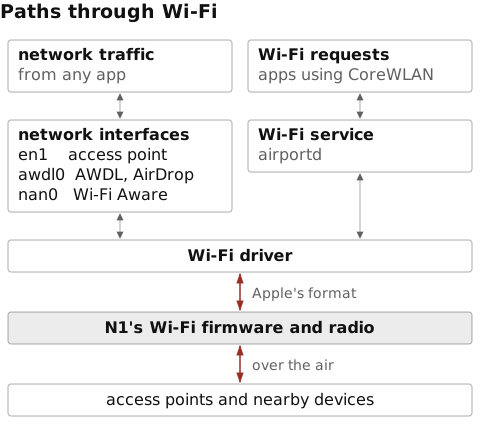
en1, and requests about Wi-Fi itself go through CoreWLAN to airportd. Both reach N1 through the Wi-Fi driver. On the other side, N1’s radio sends and receives over the air, to access points and nearby devices. The interface names are the ones our Mac lists.Firmware is full of internal checks, called asserts, that stop it when something “impossible” happens. One of the 85 files, _wfa, lists the Wi-Fi firmware’s asserts, as its name suggests, wf for Wi-Fi and a for asserts. Its first lines show it’s a property list, the same format as an app’s Info.plist, and macOS’s plutil accepts it as one:
$ head -4 ftab/_wfa
<?xml version="1.0" encoding="UTF-8"?>
<!DOCTYPE plist PUBLIC "-//Apple//DTD PLIST 1.0//EN" "http://www.apple.com/DTDs/PropertyList-1.0.dtd">
<plist version="1.0">
<dict>
$ plutil -lint ftab/_wfa
ftab/_wfa: OK
It has eight sections, one for each separately built part of the Wi-Fi firmware, and 9,251 asserts in all. Each entry gives an assert’s number and the source file, function and line it sits in:
$ python3 -c 'import plistlib; m = plistlib.load(open("ftab/_wfa", "rb")); print({s: len(c) for s, c in m.items()}, sum(map(len, m.values())))'
{'LMAC2G': 1688, 'LMAC5G': 1688, 'PHY2G': 548, 'PHY5G': 618, 'RX': 470, 'SCAN': 629, 'TX': 983, 'UMAC': 2627} 9251
$ plutil -extract UMAC.0x50de86 json -r -o - ftab/_wfa; echo
{
  "file" : "mlme.c",
  "function" : "SmIllegalEventInThisState",
  "line" : 1421,
  "title_size" : 0,
  "title_str" : "ASSERT: mlme.c-1421:SmIllegalEventInThisState"
}
In Apple’s manifest the other files whose names start with wf are Wi-Fi, such as wfrp, WiFiRx, and every one of the 9,251 entries has a title starting with ASSERT::
$ plutil -convert json -o - ftab/_wfa | grep -o '"title_str":"ASSERT:' | wc -l
    9251
Its 542 source file names appear in two files of the package, _wfa and a second list like it, _wma, and in none of the other 83, the Wi-Fi firmware included. We can check that by listing the names, then searching the other 83 files for each one as a whole name:
$ plutil -convert json -o - ftab/_wfa | grep -o '"file":"[^"]*"' | cut -d'"' -f4 | sort -u > names.txt
$ wc -l < names.txt
     542
$ python3 - <<'EOF'
import os, re
names = open('names.txt').read().split()
whole = re.compile(rb'(?<![\w.])(' + b'|'.join(re.escape(n.encode()) for n in names) + rb')(?![\w.])')
hits = [f for f in sorted(os.listdir('ftab')) if f not in ('_wfa', '_wma') and whole.search(open('ftab/' + f, 'rb').read())]
print(len(hits), 'of the other 83 files hold any of the names')
EOF
0 of the other 83 files hold any of the names
So the names reach us only through those two lists. They show which source files the firmware was built from, at least those with asserts in them. Here are a few of the 229 file names in the UMAC section, most likely the upper MAC, the part of Wi-Fi that manages connections:
$ plutil -extract UMAC json -o - ftab/_wfa | grep -o '"file":"[^"]*"' | cut -d'"' -f4 | sort -u > umac.txt
$ wc -l < umac.txt
     229
$ grep -x -E '(scan_controller|mlme|conn_mgr_roam|supplicant|key_generator|ap_authenticator|awdl_aw_scheduler|nan_dp_sm|keep_alive|arp_icmp_offload_ota|bonjour_offload_ota)\.c' umac.txt
ap_authenticator.c
arp_icmp_offload_ota.c
awdl_aw_scheduler.c
bonjour_offload_ota.c
conn_mgr_roam.c
keep_alive.c
key_generator.c
mlme.c
nan_dp_sm.c
scan_controller.c
supplicant.c
They name code for scanning for networks, joining one, roaming between access points, and the key exchange that sets up encryption, which is the job of a supplicant. mlme.c has the same name as the file where Linux’s own Wi-Fi code handles joining and leaving networks. Others cover running a hotspot, AWDL, and Wi-Fi Aware. keep_alive.c and the two offload files are named for keeping connections alive and for answering ARP and Bonjour requests, the messages other devices send to find a computer’s hardware address and services. The word offload in two of those names suggests work moved from the Mac to the chip. The other sections’ names point to link timing, signal processing, receiving, transmitting and scanning.
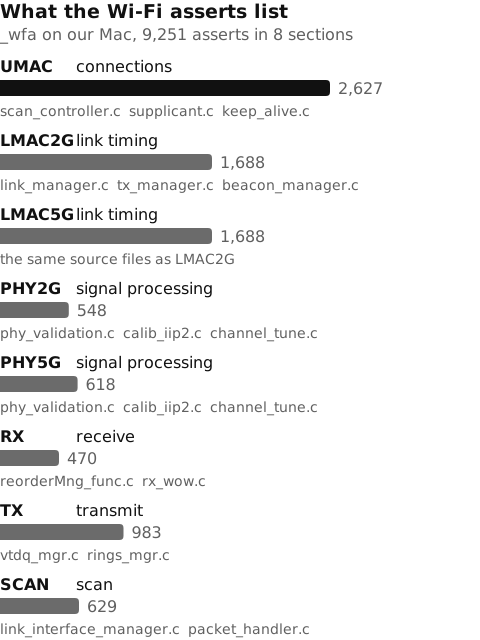
_wfa on our Mac, sized by its number of asserts, with three of the file names in it. The biggest section, UMAC, holds the code for connections. The job beside each section’s name is our own interpretation of its name and files.So N1’s Wi-Fi firmware carries code for managing connections as well as for the radio.
On the Mac, the services on the other two functions ask for numbered channels with functions named airship_ch_interface_…, and airportd imports none of them. The Wi-Fi driver sets up its own queues with the chip and sends the firmware messages over them in Apple’s own undocumented format. Those messages go through a library named WLANACIAdapter, which imports 38 queue functions, named airship_acipc_…. The library behind the numbered channels, AirshipCentauriHelperServices, imports 51 from the same family, and it’s where the AirshipCentauriHelperInterfaceUserClient connections in the snapshot above come from. Both libraries are in DriverKit’s dyld shared cache, one large file that holds all of DriverKit’s system libraries, so we copy them out with ipsw, along with the driver’s Wi-Fi library, IO80211DriverKit:
$ for f in /usr/libexec/airportd /usr/sbin/bluetoothd /usr/libexec/centaurid /System/Library/PrivateFrameworks/CoreThreadRadio.framework/threadradiod; do echo "$(basename $f) $(nm -m $f | grep -c _airship_ch_interface)"; done
airportd 0
bluetoothd 33
centaurid 14
threadradiod 27
$ ipsw dyld extract /System/Volumes/Preboot/Cryptexes/OS/System/DriverKit/System/Library/dyld/dyld_shared_cache_arm64e WLANACIAdapter AirshipCentauriHelperServices IO80211DriverKit --output . > /dev/null 2>&1
$ nm -m WLANACIAdapter | grep -c _airship_acipc_
38
$ nm -m AirshipCentauriHelperServices | grep -c _airship_acipc_
51
$ strings -a AirshipCentauriHelperServices | grep -m1 InterfaceUserClient
AirshipCentauriHelperInterfaceUserClient
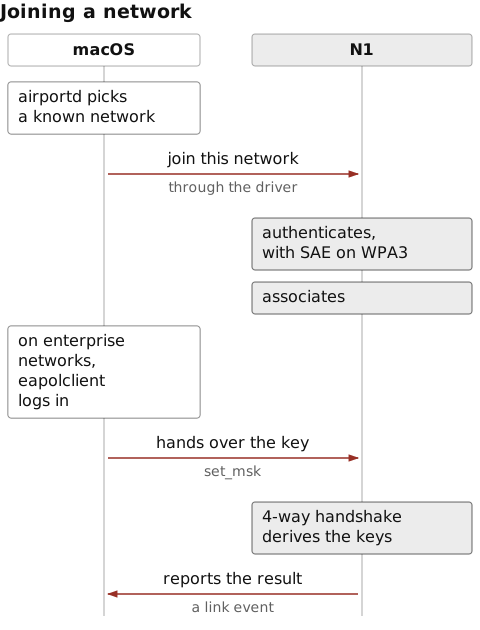
Whether macOS or N1 joins a network shows in where the code for its keys sits. Joining a network secured with WPA2 or WPA3 Personal takes authentication, association, and a handshake that derives the keys for the connection. With WPA3, authentication is itself a key exchange, called SAE. Both key derivations use fixed labels from the 802.11 standard, “Pairwise key expansion” for the handshake and “SAE Hunting and Pecking” for SAE, so whichever code derives the keys carries them. In the package, only the main Wi-Fi image and its manufacturing build do:
$ grep -a -l -E 'Pairwise key expansion|SAE Hunting and Pecking' ftab/*
ftab/aciw
ftab/awma
On the Mac, neither label is in airportd, in eapolclient, the program that logs in to enterprise networks, or in the driver’s two libraries. None of them imports the SAE functions in Apple’s crypto library either. One Wi-Fi program does, wifip2pd, which runs AWDL and Wi-Fi Aware, for pairing devices over Wi-Fi Aware, which Apple’s code calls NAN. In this loop, the first number is the labels found and the second the SAE functions imported:
$ for f in /usr/libexec/airportd /System/Library/SystemConfiguration/EAPOLController.bundle/Contents/Resources/eapolclient WLANACIAdapter IO80211DriverKit /usr/libexec/wifip2pd; do echo "$(basename $f) $(grep -a -c -E 'Pairwise key expansion|SAE Hunting and Pecking' $f) $(nm -m $f | grep -c ccsae)"; done
airportd 0 0
eapolclient 0 0
WLANACIAdapter 0 0
IO80211DriverKit 0 0
wifip2pd 0 26
$ strings -a /usr/libexec/wifip2pd | grep -m1 'NANPairing.*SAE'
_TtCVV7CoreP2P10NANPairing3SAEP33_4B94487B91F65D95BFC0BE9A4FCAE2417Context
What macOS does is pick the network and give the chip what it needs to join it. airportd decides which known network to join, which Apple calls auto-join. On an enterprise network, eapolclient runs the login, and its strings show it setting the resulting master session key, the MSK, and waiting for the handshake to complete. The driver hears from the firmware when authentication or association fails:
$ strings -a /usr/libexec/airportd | grep -m1 -o CWFAutoJoinManager
CWFAutoJoinManager
$ strings -a /System/Library/SystemConfiguration/EAPOLController.bundle/Contents/Resources/eapolclient | grep -x -E 'set_msk %d|4-way handshake complete'
set_msk %d
4-way handshake complete
$ strings -a IO80211DriverKit | grep -m1 'link down due to assoc fail'
[wcl] %s@%d:received firmware link event, link down due to assoc fail
So on our Mac, N1 runs the exchanges with the access point and derives the keys itself. macOS decides which network to join, and when, and handles the login on enterprise networks.
The Bluetooth and Thread function
Bluetooth
The Bluetooth Core Specification divides a Bluetooth system into a controller, which runs the radio and the lowest layers of each link, and a host, which runs the layers above it, such as the protocols apps use to exchange data with a device. The two talk over a standard interface, the host controller interface or HCI. In N1, the chip’s Bluetooth firmware is the controller.
On the Mac, the host side meets the chip in the Bluetooth service, bluetoothd, which holds the Bluetooth and Thread function open. Other Bluetooth processes, such as bluetoothaudiod, are part of the host side too, and apps reach Bluetooth through frameworks such as CoreBluetooth.
As macOS starts, bluetoothd asks for seven channels, 64 to 69 and 71:
$ log show --last boot --style compact --predicate 'process == "bluetoothd" AND eventMessage CONTAINS "open] interface_id="'
Timestamp               Ty Process[PID:TID]
2026-10-18 10:29:06.279 Df bluetoothd[164:b8a] (AirshipCentauriHelper) Airship [interface.cpp:275:open] interface_id=64, timeout=5000 ms
2026-10-18 10:29:06.282 Df bluetoothd[164:b8a] (AirshipCentauriHelper) Airship [interface.cpp:275:open] interface_id=65, timeout=5000 ms
2026-10-18 10:29:06.285 Df bluetoothd[164:b8a] (AirshipCentauriHelper) Airship [interface.cpp:275:open] interface_id=66, timeout=5000 ms
2026-10-18 10:29:06.288 Df bluetoothd[164:b8a] (AirshipCentauriHelper) Airship [interface.cpp:275:open] interface_id=67, timeout=5000 ms
2026-10-18 10:29:06.291 Df bluetoothd[164:b8a] (AirshipCentauriHelper) Airship [interface.cpp:275:open] interface_id=68, timeout=5000 ms
2026-10-18 10:29:06.294 Df bluetoothd[164:b8a] (AirshipCentauriHelper) Airship [interface.cpp:275:open] interface_id=69, timeout=5000 ms
2026-10-18 10:29:06.297 Df bluetoothd[164:b8a] (AirshipCentauriHelper) Airship [interface.cpp:275:open] interface_id=71, timeout=5000 ms
bluetoothd’s own code names them. A small function takes a channel number, looks it up in a table of eight names for 64 to 71, and returns unknown for any other number. dyld_info prints where each table entry points, and the strings at those addresses are the names:
$ otool -arch arm64e -tV /usr/sbin/bluetoothd | sed -n '/^00000001000ee868/,/^00000001000ee88c/p'
00000001000ee868	sub	w8, w0, #0x40
00000001000ee86c	cmp	w8, #0x7
00000001000ee870	b.hi	0x1000ee884
00000001000ee874	adrp	x9, 2624 ; 0x100b2e000
00000001000ee878	add	x9, x9, #0xad0
00000001000ee87c	ldr	x0, [x9, w8, uxtw #3]
00000001000ee880	ret
00000001000ee884	adrp	x0, 2168 ; 0x100966000
00000001000ee888	add	x0, x0, #0xf9e ; literal pool for: "unknown"
00000001000ee88c	ret
$ dyld_info -arch arm64e -fixups /usr/sbin/bluetoothd | grep -E '0x100B2E(AD|AE|AF|B0)[08] '
        __DATA_CONST    __const          0x100B2EAD0         rebase  0x10097E8AE
        __DATA_CONST    __const          0x100B2EAD8         rebase  0x10097E8FF
        __DATA_CONST    __const          0x100B2EAE0         rebase  0x10097E950
        __DATA_CONST    __const          0x100B2EAE8         rebase  0x10098554D
        __DATA_CONST    __const          0x100B2EAF0         rebase  0x100985550
        __DATA_CONST    __const          0x100B2EAF8         rebase  0x100985554
        __DATA_CONST    __const          0x100B2EB00         rebase  0x100966F9E
        __DATA_CONST    __const          0x100B2EB08         rebase  0x100985558
$ otool -arch arm64e -v -s __TEXT __cstring /usr/sbin/bluetoothd | grep -E '^0000000100(97e8ae|97e8ff|97e950|98554d|985550|985554|966f9e|985558) '
0000000100966f9e  unknown
000000010097e8ae  hci
000000010097e8ff  acl
000000010097e950  sco
000000010098554d  le
0000000100985550  lea
0000000100985554  lla
0000000100985558  lmp
$ strings -a /usr/sbin/bluetoothd | grep -m1 'LEA Audio'
No LEA Audio context
Going by those names, most likely each kind of Bluetooth traffic gets its own channel. Channel 64 is hci, for HCI’s commands and events. Channels 65, acl, and 66, sco, are named for Bluetooth Classic’s data and voice links, and 67, le, and 68, lea, for Low Energy’s data and LE Audio, which bluetoothd’s code calls LEA. Channel 71, lmp, is named for the link manager protocol, which controllers use with each other. We haven’t found what lla, on 69, stands for. The entry for 70 is unknown, so bluetoothd skips 70.
centaurid, the service that looks after the chip as a whole, keeps the names of the chip’s asserts, 1,353 in the Mac’s copy, and many of them name the parts of a Bluetooth controller. One belongs to the link manager, the part of a controller that sets up connections, and is named for a failure while handling the host’s command to create one:
$ strings -a /usr/libexec/centaurid | grep -c CAPTURE_POINT_ASSERT
1353
$ strings -a /usr/libexec/centaurid | grep LM_PROC_HCI_CREATE_CONNECTION_FAILED
CAPTURE_POINT_ASSERT_LM_PROC_HCI_CREATE_CONNECTION_FAILED
Others cover scanning for Bluetooth Low Energy (LE) devices, adaptive frequency hopping, which moves each link around the 2.4 GHz band to avoid busy channels, the controller’s part of LE Audio, and power control. One of each:
$ strings -a /usr/libexec/centaurid | grep -x -E 'CAPTURE_POINT_ASSERT_(BLE_SCAN_ZERO_WINDOW_OR_INTERVAL|AFH_LINK_MANAGEMENT_STATE_MACHINE_ILLIGALE_STATE|BLE_AUDIO_PARAMS_ALLOCATION_FAIL|LC_POWER_CONTROL_INVALID_POWER_INDEX_REQUEST)'
CAPTURE_POINT_ASSERT_BLE_AUDIO_PARAMS_ALLOCATION_FAIL
CAPTURE_POINT_ASSERT_BLE_SCAN_ZERO_WINDOW_OR_INTERVAL
CAPTURE_POINT_ASSERT_LC_POWER_CONTROL_INVALID_POWER_INDEX_REQUEST
CAPTURE_POINT_ASSERT_AFH_LINK_MANAGEMENT_STATE_MACHINE_ILLIGALE_STATE
The Bluetooth standard gives these jobs to the controller. Since centaurid names asserts for each of them, most likely their code sits in the chip, where the standard puts it.
On our Mac we can also watch the host and the controller exchange HCI messages, because bluetoothd can write that traffic to a trace file. We recorded a trace while restarting bluetoothd. A restarted bluetoothd resets the controller and sets it up again, so the trace opens with that start-up. bluetoothd first sends three of Apple’s own commands, which HCI allows a manufacturer to add, then resets the controller and asks what it is. The controller answers with Apple as its manufacturer. Its list of features includes Channel Sounding, which Bluetooth 6.0 added for measuring the distance between two devices, and bluetoothd then turns on the host’s support for it.
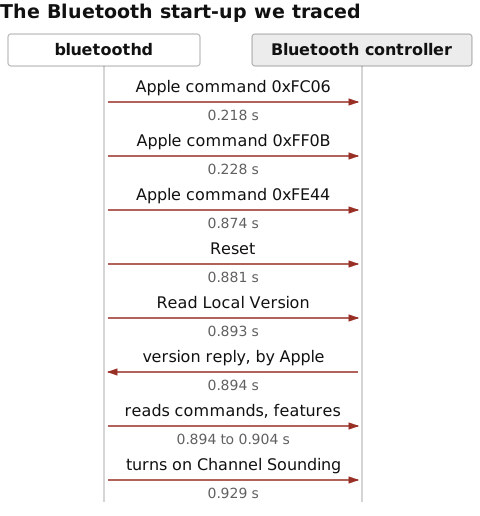
We decoded the trace with tshark, Wireshark’s command-line tool, version 4.6.3. Here is the start of it, the controller’s version reply, and the Channel Sounding bits in its feature list. Each of the last three finds its packet by its contents, so they work on your own trace too. They pick the reply to Read Local Version (opcode 0x1001), the reply listing the controller’s LE features (0x2087), and the LE Set Host Feature command that turns on feature bit 47:
$ tshark -r trace.pklg -T fields -e frame.number -e frame.time_relative -e _ws.col.Info | sed -n 2,11p
2	0.218000000	Sent Vendor Command 0x0006 (opcode 0xFC06)
3	0.228000000	Rcvd Command Complete (Vendor Command 0x0006 [opcode 0xFC06])
4	0.228000000	Sent Vendor Command 0x030B (opcode 0xFF0B)
5	0.874000000	Rcvd Command Complete (Vendor Command 0x030B [opcode 0xFF0B])
6	0.874000000	Sent Vendor Command 0x0244 (opcode 0xFE44)
7	0.881000000	Rcvd Command Complete (Vendor Command 0x0244 [opcode 0xFE44])
8	0.881000000	Sent Reset
9	0.893000000	Rcvd Command Complete (Reset)
10	0.893000000	Sent Read Local Version Information
11	0.894000000	Rcvd Command Complete (Read Local Version Information)
$ tshark -r trace.pklg -V -Y 'bthci_evt.opcode == 0x1001' | grep -E 'HCI Version|Manufacturer Name'
    HCI Version: Unknown (0x11)
    Manufacturer Name: Apple, Inc. (0x004c)
$ tshark -r trace.pklg -V -Y 'bthci_evt.opcode == 0x2087' | grep -E 'Channel Sounding(: | \(Host)'
        .... .... .... .... .1.. .... .... .... .... .... .... .... .... .... .... .... = Channel Sounding: True
        .... .... .... .... 0... .... .... .... .... .... .... .... .... .... .... .... = Channel Sounding (Host support): False
$ tshark -r trace.pklg -V -Y 'bthci_cmd.feature_bit_number == 47' | grep 'Feature Bit'
    Feature Bit Number: Unknown (47)
    Feature Bit Value: enabled (0x01)
Wireshark labels the version number in the reply, and bit 47, which the feature list above shows as Channel Sounding host support, Unknown.
These commands switch on bluetoothd’s trace file, restart bluetoothd, which macOS starts again as soon as it stops, check in the log that tracing is on, and copy the trace out:
$ sudo defaults write /Library/Preferences/com.apple.MobileBluetooth.debug HCITraces '<dict><key>StackDebugEnabled</key><true/><key>HCILiveTraces</key><true/><key>HCIFileTraces</key><true/></dict>'
$ sudo killall bluetoothd
$ log show --last 15m --info --predicate 'process == "bluetoothd" AND eventMessage CONTAINS "fileHCI:disabled->enabled"'
Timestamp                       Thread     Type        Activity             PID    TTL
2026-10-19 08:39:41.130118+0200 0x5bca     Default     0x0                  1733   0    bluetoothd: [com.apple.bluetooth:PacketLogger.HCI] Change HCI config settings to … liveHCI:disabled->enabled fileHCI:disabled->enabled …
$ sudo cp /var/root/Library/Logs/Bluetooth/bluetoothd-hci-latest.pklg trace.pklg
The trace holds the addresses of nearby devices, which is why we show only decoded lines from it. To switch tracing off again:
$ sudo defaults delete /Library/Preferences/com.apple.MobileBluetooth.debug HCITraces
$ sudo killall bluetoothd
In part 2 we will record a new trace the same way, of a whole exchange with a small Bluetooth board.
Thread
Thread is built on a low-power radio standard called IEEE 802.15.4. OpenThread, an open-source Thread implementation, offers a split much like Bluetooth’s. In its radio co-processor design, the host runs most of Thread, and the chip with the radio runs only a small layer that sends and receives frames. The two talk a protocol called Spinel.
N1’s code follows that design, with the radio co-processor built into the Bluetooth firmware. The Bluetooth firmware in our Mac’s package, acib, contains the string RCP 15.4 FW Version, RCP being OpenThread’s short name for a radio co-processor, and centaurid lists 67 asserts with Thread in their names:
$ strings -a ftab/acib | grep 'RCP 15.4'
RCP 15.4 FW Version
$ strings -a /usr/libexec/centaurid | grep CAPTURE_POINT_ASSERT | grep -c THREAD
67
$ strings -a /usr/libexec/centaurid | grep -E 'PROTOCOL_THREAD_((TX|RX)_POWER_UP_FAILED|DIAG_SWEEP_TX_FAILURE)'
CAPTURE_POINT_ASSERT_PROTOCOL_THREAD_DIAG_SWEEP_TX_FAILURE
CAPTURE_POINT_ASSERT_PROTOCOL_THREAD_TX_POWER_UP_FAILED
CAPTURE_POINT_ASSERT_PROTOCOL_THREAD_RX_POWER_UP_FAILED
On the Mac, the Thread service, threadradiod, is built to play the host’s part. Its log strings show code to create its own channel on the shared function and to read Spinel frames from it:
$ strings -a /System/Library/PrivateFrameworks/CoreThreadRadio.framework/threadradiod | grep -E 'Interface ID:|parse spinel frame'
%s: airship_ch_interface_create() created Successfully with Interface ID:%d ...
%s, failed to parse spinel frame !
The number it asks for is kept in the program’s data. The function that opens the channel, airship_open, hands a settings structure called thread_ctx to airship_open_rings. That function passes the 4 bytes at offset 0xc of the structure to airship_ch_interface_open as the channel number, its second argument (w1). The structure starts at 0x10053a368, so those bytes are the second word on the last line below, 0x48, which is 72:
$ objdump --macho --arch arm64e --no-show-raw-insn -d --dis-symname __ZN2ot5Posix13HdlcInterface12airship_openEv /System/Library/PrivateFrameworks/CoreThreadRadio.framework/threadradiod | grep -B2 'bl.*airship_open_rings'
10027a9d8:	adrp	x0, 704 ; 0x10053a000
10027a9dc:	add	x0, x0, #0x368
10027a9e0:	bl	__ZN2ot5Posix13HdlcInterface18airship_open_ringsEP18apple_pcie_ipc_ctx
$ nm -arch arm64e -m /System/Library/PrivateFrameworks/CoreThreadRadio.framework/threadradiod | grep 10053a368
000000010053a368 (__DATA,__data) non-external __ZL10thread_ctx
$ objdump --macho --arch arm64e --no-show-raw-insn -d --dis-symname __ZN2ot5Posix13HdlcInterface18airship_open_ringsEP18apple_pcie_ipc_ctx /System/Library/PrivateFrameworks/CoreThreadRadio.framework/threadradiod | grep -B3 '_airship_ch_interface_open$'
10027d1d4:	ldur	x8, [x29, #-0x20]
10027d1d8:	ldr	w1, [x8, #0xc]
10027d1dc:	mov	w2, #0x2710
10027d1e0:	bl	0x10043bd20 ; symbol stub for: _airship_ch_interface_open
$ otool -arch arm64e -s __DATA __data /System/Library/PrivateFrameworks/CoreThreadRadio.framework/threadradiod | grep ^000000010053a370
000000010053a370	00000000 00000048 00000000 00000000
The I/O Registry snapshot in the first section lists no connection from threadradiod to the chip, and the logs we collected from that boot held no opening of channel 72. Most likely threadradiod wasn’t running. On its own, launchd, which starts the Mac’s daemons, starts it only when another program connects to its service, com.apple.wpantund.xpc. Its launch file has no RunAtLoad, which would start it at boot, and no KeepAlive, which would keep it running. EnablePressuredExit lets the system stop it when it’s idle and memory is short:
$ plutil -p /System/Library/LaunchDaemons/com.apple.threadradiod.plist
{
  "EnablePressuredExit" => true
  "EnableTransactions" => true
  "ExitTimeOut" => 3
  "Label" => "com.apple.threadradiod"
  "MachServices" => {
    "com.apple.wpantund.xpc" => true
  }
  "PosixSpawnType" => "Interactive"
  "ProgramArguments" => [
    0 => "/System/Library/PrivateFrameworks/CoreThreadRadio.framework/threadradiod"
  ]
}
Starting it by hand with sudo shows the channel open. The library threadradiod uses to reach the chip, AirshipCentauriHelper, logs the request for channel 72. The driver side logs it too, in AirshipCentauriHelperInterfaceUserClient, the kind of connection the snapshot in the first section counts, and macOS files that line under kernel:
$ sudo launchctl kickstart system/com.apple.threadradiod
$ log show --last boot --style compact --predicate '(process == "threadradiod" AND eventMessage CONTAINS "interface.cpp") OR (process == "kernel" AND eventMessage CONTAINS "interface index 72")'
Timestamp               Ty Process[PID:TID]
2026-10-18 17:04:22.162 Df threadradiod[3247:1f46f] (AirshipCentauriHelper) Airship [interface.cpp:1389:airship_ch_interface_create]
2026-10-18 17:04:22.163 Df threadradiod[3247:1f46f] (AirshipCentauriHelper) Airship [interface.cpp:275:open] interface_id=72, timeout=10000 ms
2026-10-18 17:04:22.164 Df kernel[0:87b6] () Airship [AirshipCentauriHelperInterfaceUserClient.cpp:518:dispatch_open] interface index 72
2026-10-18 17:04:22.167 Df threadradiod[3247:1f46f] (AirshipCentauriHelper) Airship [interface.cpp:568:open] complete
The timeout in the request, 10,000 ms, is the 0x2710 that airship_open_rings passes beside the channel number.
We saw the channel open. In part 2 we will look at the first Spinel messages on it, the ones threadradiod and the chip exchange as it starts, and compare them with Bluetooth’s start-up, since the two share a controller.
The control function
The third function is how macOS starts the chip and looks after it. Behind it is N1’s control processor, which runs RTKit, the operating system that runs on various helper processors in Apple’s chips, as the Linux kernel’s RTKit library, written by Asahi Linux contributors, describes it. N1’s control processor code, rkos, carries an RTKit version banner, and so do the main Wi-Fi and Bluetooth images, aciw and acib:
$ strings -a ftab/rkos | grep -o 'RTKit_release[.0-9a-z_-]*'
RTKit_release-3514.0.15.release
$ strings -a ftab/aciw | grep -o 'RTKit_release[.0-9a-z_-]*'
RTKit_release-3514.0.15.release
$ strings -a ftab/acib | grep -o 'RTKit_release[.0-9a-z_-]*'
RTKit_release-3514.0.15.release
Strings in the control processor’s code and in the chip’s loader, _osl, both from our Mac’s package, suggest what the control processor does. They mention starting the radio firmware, keeping its clock matched to the Mac’s through PTM, PCIe’s way of syncing clocks, crash logs, power statistics, and coexistence, the usual term for coordinating Wi-Fi and Bluetooth when both need the air:
$ strings -a ftab/rkos | grep -E '!init ptm|Crashlog for|FLR: could not clear coex boot stage for subsystem %x status'
!init ptm, st %#x
Crashlog for %s
FLR: could not clear coex boot stage for subsystem %x status %x
$ strings -a ftab/_osl | grep -E 'Loading and Starting|powerstats_read_all'
Loading and Starting %s
%s() cca_phm_powerstats_read_all() Error 0x%x ---
FLR is PCIe’s name for resetting a single function. The strings show that the code is there. How the control processor uses it is something only watching it run would show.
On the Mac’s side the control function belongs to centaurid, and here we have more than strings. Our Mac’s log shows centaurid starting the chip and then opening the control channel, channel 1.
What else is in the package
The package holds more than the images from the sections above. Less than half of it is those images. Almost half is manufacturing builds, the images with Manuf in Apple’s names for them, plus two Wi-Fi assert lists, _wfa and _wma. Six of the 13 manufacturing builds are separate images, with names of their own:
awma  Wireless1,ACIWiFiTxManuf
swfm  Wireless1,ScanWifiManuf
w2lm  Wireless1,Wifi2GLMACManuf
w5lm  Wireless1,Wifi5GLMACManuf
wfrm  Wireless1,WiFiRxManuf
wftm  Wireless1,WiFiTxManuf
The other seven are the five Bluetooth images and the two Wi-Fi PHY images again. In the manifest, each of them has the same hash under two names, one ending in Manuf, such as Wifi2GLPhyManuf, and one without, such as Wifi2GLPhy, and the package holds the same bytes twice:
$ for p in acib:acim btse:btsm phyb:pbtm bt5p:bt5m scab:sbtm w2pp:w2pm w5pp:w5pm; do cmp -s ftab/${p%:*} ftab/${p#*:} && echo identical; done | wc -l
       7
By the same pattern, _wma reads as Wi-Fi manufacturing asserts, since Apple’s names for w2lm, wftm and wfrm end in Manuf. The file names that only _wma has include factory and mfg_ code:
$ plutil -convert json -o - ftab/_wma | grep -o '"file":"[^"]*"' | cut -d'"' -f4 | sort -u > wma.txt
$ comm -13 names.txt wma.txt | grep -E '^(factory|mfg)'
factory_efuse_flavor_init.c
factory_otp_export.c
factory_otp_import.c
mfg_trim.c
mfg_trim_loopback.c
Most of the rest is tables of radio settings. wfrd, the Wi-Fi regulatory data in Apple’s manifest, names 30 of the 41 tables and holds the SHA-384 hash of all 41:
$ ls ftab | grep -c -E '^[PRSCW][0-9]{3}$'
41
$ comm -12 <(strings -a ftab/wfrd | grep -o -E '\b[PRSCW][0-9]{3}\b' | sort -u) <(ls ftab | grep -E '^[PRSCW][0-9]{3}$') | wc -l
      30
$ xxd -p ftab/wfrd | tr -d '\n' > wfrd.hex
$ for f in ftab/[PRSCW][0-9][0-9][0-9]; do grep -q $(shasum -a 384 $f | cut -c1-96) wfrd.hex && echo found; done | wc -l
      41
Going by its messages, the chip’s loader, _osl, picks among them. It reads the product variant, which it calls the SKU, and the front-end modules for 2.4 and 5 GHz, the amplifiers and switches between the radio and its antennas. It finds a regulatory table by a hardware ID and takes each file’s digest from a recipe. wfrd holds the tables’ names and digests, so most likely it’s that recipe:
$ strings -a ftab/_osl | grep -E 'using SKU|using FEM|regulatory table for HW|in recipe\.'
Couldn't find digest for %s in recipe. Using digest=0.
Found regulatory table for HW ID[0:63] 0x%llx: %s (%zu)
using SKU %s
using FEM 2G 0x%llx
using FEM 5G 0x%llx
All 16 P tables carry the label Regulatory Power Table, so most likely they hold the transmit power that each country’s rules allow:
$ ls ftab | grep -c '^P'
16
$ grep -a -l 'Regulatory Power Table' ftab/P* | wc -l
      16
We haven’t found what the other 25 tables hold. We can sort the 85 files into those groups by name, each file in exactly one group, and add up their sizes with a few lines of Python:
  5.9 MB  19%  Wi-Fi images
  5.3 MB  17%  Bluetooth and Thread images
  1.8 MB   6%  control processor and loader
  8.0 MB  26%  manufacturing builds
  6.7 MB  22%  two Wi-Fi assert lists
  2.4 MB   8%  radio settings tables
  0.6 MB   2%  other data
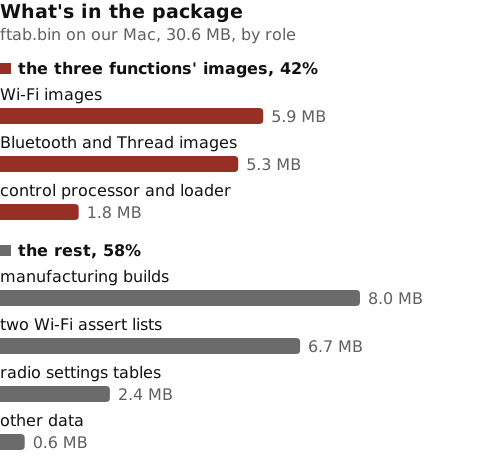
ftab.bin on our Mac, grouped and sized. The first three bars are the firmware images for the three functions.How the firmware reaches the chip
In the boot we logged, centaurid sent N1 its firmware, the package we split earlier. In its log further down, centaurid records the chip in a state it calls ROM before sending anything, and in one it calls Running once the firmware is in. So most likely the chip starts with only its boot ROM, the small program built into the chip that runs first.
The Preboot volume holds two copies of the package. The one we split is in restore. The other sits deeper, in boot, next to the global manifest we look at below, and the two are the same file:
$ shasum -a 256 /System/Volumes/Preboot/*/restore/Firmware/t2026mac*/Release/ftab.bin /System/Volumes/Preboot/*/boot/*/usr/standalone/firmware/Centauri/ftab.bin
65b0aff14e76e5680b2516126851416fac1e38622d20af2f2d832e0d443e0ec9  /System/Volumes/Preboot/<volume>/restore/Firmware/t2026macG2/Release/ftab.bin
65b0aff14e76e5680b2516126851416fac1e38622d20af2f2d832e0d443e0ec9  /System/Volumes/Preboot/<volume>/boot/<hash>/usr/standalone/firmware/Centauri/ftab.bin
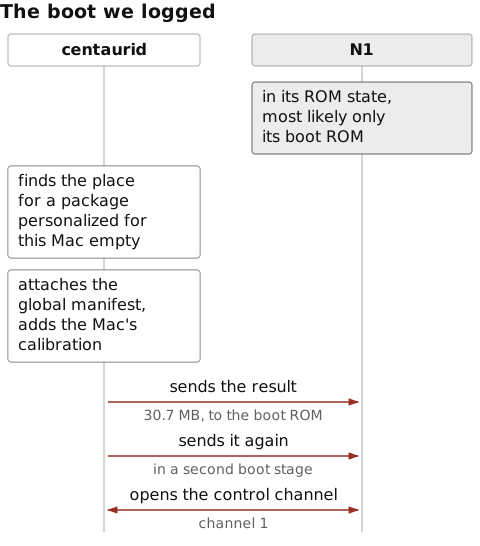
centaurid takes in macOS, and the arrows are what it sends over the control function. The figure shows centaurid’s side. The checks on the manifest most likely happen inside the chip.centaurid first looked for a copy of the package personalized for this one Mac, in a fixed place in another hidden volume. Personalized is Apple’s word for firmware it signs for a single device by adding that device’s unique chip ID, so the copy works on that device alone. That place was empty, so it used the package and the global manifest. It added the manifest to the package itself, as the no manifest found in ftab and stitching global manifest lines below show. The global manifest is an Apple-signed list of the images the package may contain, written for this board as a whole. centaurid added the Mac’s factory calibration and sent the result to the boot ROM through a separate boot driver. In a second boot stage it sent the same image again. Only then did it open the control channel, channel 1, which the log calls CCHI, and ping the chip. The chip answered with its RTKit version, the same one as in rkos. centaurid closed that channel, opened it again for normal use, and marked the chip as running. These are its log lines for those steps, in our Mac’s current boot. The predicate leaves out a second copy of the first lines, logged by Apple’s firmware-update library:
$ log show --last boot --style compact --predicate 'process == "centaurid" AND subsystem != "com.apple.AppleConvergedFirmwareUpdater"' | grep -E 'chipStateDidChangeFrom|copyDefaultPersonalizedFirmwarePath|isPersonalizedFirmwarePresent|isUnsignedFirmwarePresent|no manifest found|stitching|found FDR|sendImage: (image size|successfully)|opening boot driver for secondary|opening CCHI|interface_id=|pingCheck: success|CCHIInterface::start'
2026-10-18 10:29:04.750 Df centaurid[101:a7c] [com.apple.centaurid:default] ChipManager::chipStateDidChangeFrom:to:: Unknown -> ROM
2026-10-18 10:29:04.752 Df centaurid[101:a7c] [com.apple.centaurid:default] ACFUBootInterface::copyDefaultPersonalizedFirmwarePath: result: /System/Volumes/iSCPreboot/SFR/current/Centauri//ftab.bin
2026-10-18 10:29:04.752 Df centaurid[101:a7c] [com.apple.centaurid:default] ACFUBootInterface::isPersonalizedFirmwarePresentInDefaultLocation: result: No
2026-10-18 10:29:04.752 Df centaurid[101:a7c] [com.apple.centaurid:default] ACFUBootInterface::isUnsignedFirmwarePresent: found unsigned firmware and global manifest
2026-10-18 10:29:04.765 E  centaurid[101:a7c] [com.apple.centaurid:default] ACFUFTABFile::copyManifest: no manifest found in ftab
2026-10-18 10:29:04.802 Df centaurid[101:a7c] [com.apple.centaurid:default] ACFUBootInterface::setGlobalManifestInFirmware: stitching global manifest
2026-10-18 10:29:04.854 Df centaurid[101:a7c] [com.apple.centaurid:default] CentauriFirmware::copyCalibrationData: found FDR calibration data: BWC3
2026-10-18 10:29:04.881 Df centaurid[101:a7c] [com.apple.centaurid:default] CentauriTransport::sendImage: image size 30690710 -> 30691328
2026-10-18 10:29:04.927 Df centaurid[101:a7c] [com.apple.centaurid:default] CentauriTransport::sendImage: successfully sent image: out code 0x00000001
2026-10-18 10:29:04.927 Df centaurid[101:a7c] [com.apple.centaurid:default] CentauriTransport::openBootDriver: opening boot driver for secondary boot stage
2026-10-18 10:29:05.348 Df centaurid[101:a7c] [com.apple.centaurid:default] CentauriTransport::sendImage: image size 30690710 -> 30691328
2026-10-18 10:29:06.289 Df centaurid[101:a7c] [com.apple.centaurid:default] CentauriTransport::sendImage: successfully sent image: out code 0x00000001
2026-10-18 10:29:06.295 Df centaurid[101:a7c] [com.apple.centaurid:default] CentauriTransport::openInterfaceDriver: opening CCHI interface driver
2026-10-18 10:29:06.295 Df centaurid[101:a7c] (AirshipCentauriHelper) Airship [interface.cpp:275:open] interface_id=1, timeout=15000 ms
2026-10-18 10:29:06.782 Df centaurid[101:a7c] [com.apple.centaurid:default] CentauriTransport::pingCheck: success: 'RTKit_release-3514.0.15.release RTKitOSPlatform-3431.0.25~002852, CentauriControlApp-b0-2.1.54~1130'
2026-10-18 10:29:06.787 Df centaurid[101:a7c] [com.apple.centaurid:default] CCHIInterface::start::
2026-10-18 10:29:06.787 Df centaurid[101:a7c] (AirshipCentauriHelper) Airship [interface.cpp:275:open] interface_id=1, timeout=5000 ms
2026-10-18 10:29:06.806 Df centaurid[101:a7c] [com.apple.centaurid:default] ChipManager::chipStateDidChangeFrom:to:: ROM -> Running
The global manifest sits beside the second copy of the package, with two variants marked dev and insecure, most likely for chips used in development. It names the chip it’s for, CHIP 8230, which is 0x2026, the t2026 in the package’s folder name. It’s signed with a certificate named for T2026 and lists 38 files, as many as the build manifest named. One of them is wfrd, with the hash of the same bytes we split, so through wfrd the signature also covers the 41 tables:
$ cp /System/Volumes/Preboot/*/boot/*/usr/standalone/firmware/Centauri/*.im4m .
$ ls *.im4m
centauri.j873gap.dev.im4m
centauri.j873gap.im4m
centauri.j873gap.insecure.im4m
$ ipsw img4 im4m info centauri.j873gap.im4m | grep -E '^      CHIP |Images:|Subject:'
      CHIP (ApChipID): 8230
  Images: 38
    Subject: T2026-SDOM1-TssLive-ManifestKey-Global-RevA-DC
$ ipsw img4 im4m info centauri.j873gap.im4m | grep -A1 '^    wfrd:'
    wfrd:
      DGST: 3c9a234a520b291cb23ab0955c0e7001b35d5f892be0e9420c5903122a36b704a27ee6a46c6f9d8b6f9d01f796566399
$ shasum -a 384 ftab/wfrd
3c9a234a520b291cb23ab0955c0e7001b35d5f892be0e9420c5903122a36b704a27ee6a46c6f9d8b6f9d01f796566399  ftab/wfrd
We found no code in centaurid, or in CentauriBooter, the library that builds what’s sent, that checks the manifest’s signature. centaurid imports none of Apple’s Img4 functions, which read and check manifests like this one, and CentauriBooter imports only two, which read a manifest’s fields:
$ dyld_info -imports /usr/libexec/centaurid | grep -c -i img4
0
$ dyld_info -imports /System/Library/PrivateFrameworks/CentauriBooter.framework/CentauriBooter | grep -i img4
      _Img4DecodeGetObjectPropertyData  (from libamsupport)
      _Img4DecodeInitManifest  (from libamsupport)
centaurid finds the manifest, stitches it in and sends it, and the checks are N1’s. Its loader, _osl, has messages for checking the manifest and each image’s digest:
$ strings -a ftab/_osl | grep -E 'Manifest (not valid|Hash Valid)|^Digest missing|VALIDATED'
Warning: Manifest not valid
ROM Manifest Hash Valid
Manifest Hash Validated but missing digest
Digest missing or check failed (%s)
FIRMWARE %s VALIDATED
ROM Manifest Hash Valid most likely reports a check by the boot ROM, which runs first.
The loader also has code for ASLR, address space layout randomization, which moves the radio firmware images to a random address as it loads them. An exploit for a memory-corruption bug in the firmware typically overwrites a pointer, such as a return address on the stack or a function pointer, with the address of code it wants to run. ASLR changes those addresses from one load to the next, so the exploit can’t hard-code them and first needs a second bug that leaks one. The loader logs each segment it adjusts for the new address, and the smallest and largest slide, the random offset an image moves by. The control processor’s code, rkos, has two settings for ASLR and logs the slide as well:
$ strings -a ftab/_osl | grep -E 'ASLR patching segment|aslr slide'
Maximum aslr slide: 0x%x
Minimum aslr slide: 0x%x
ASLR patching segment: %s
$ strings -a ftab/rkos | grep -E '^aslr_|ASLR Slide'
aslr_fw_mask
aslr_mode
ASLR Slide: 0x%016X
When Project Zero exploited the Broadcom Wi-Fi chip in the iPhone 7 in 2017, its firmware did “not employ ASLR”.
Further reading
- Apple Newsroom, Apple unveils iPhone 17 Pro and iPhone 17 Pro Max (2025)
- Apple Platform Deployment, Wi-Fi and Ethernet specifications for Apple devices
- Bluetooth SIG, Bluetooth Core Specification 6.0, Architecture
- OpenThread, Co-processor designs
- Linux kernel, Apple RTKit protocol library, by the Asahi Linux contributors
- Milan Stute, David Kreitschmann and Matthias Hollick, One Billion Apples’ Secret Sauce: Recipe for the Apple Wireless Direct Link Ad hoc Protocol (MobiCom 2018), on how AWDL works
Next: part 2, Speaking Bluetooth to N1.